
Connecter Open Raadsinformatie
Ce connecteur donne à Claude l'accès aux pièces de décision publiques de 310 communes, 8 provinces et 13 offices des eaux : environ 5,6 millions de documents. Choisissez ci-dessous comment relier Claude.
Claude Connecter avec Claude
Connecter avec Claude Desktop recommandé
Recommended for most users. Open Settings → Connectors and add a custom connector.
Ajouter un connecteur personnalisé dans Claude Desktop
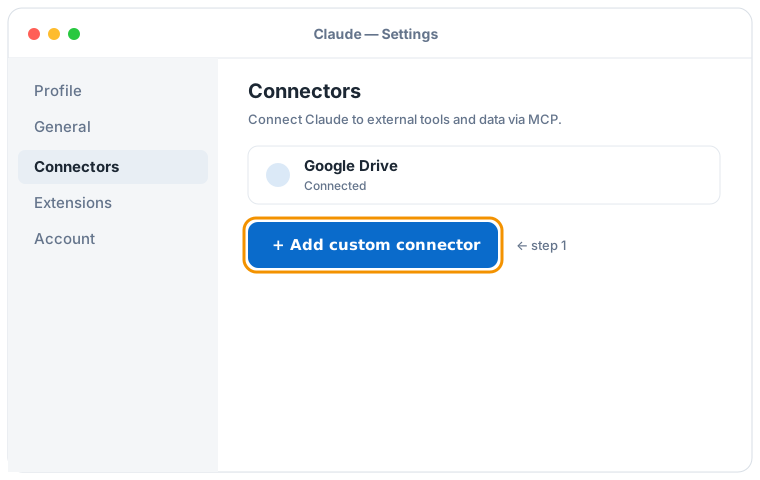

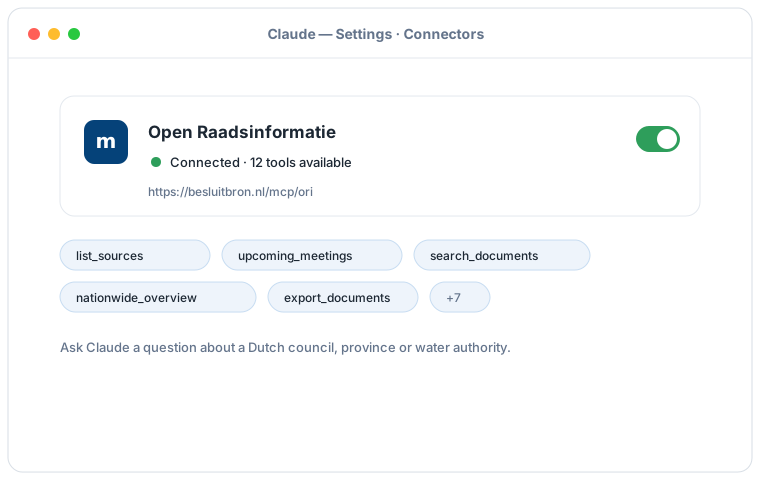
Illustration schématique du flux Claude Desktop ; les écrans exacts peuvent varier selon la version. Cliquez sur une illustration pour l'agrandir.
Ajoutez un connecteur personnalisé avec cette URL :
https://besluitbron.nl/mcp/ori
Aucune authentification n'est requise.
Cette adresse est celle de cette installation. Une organisation qui mène le service elle-même utilise sa propre adresse. Héberger soi-même.
Connecter avec Claude Code
Run a single command in the terminal:
claude mcp add --transport http ori https://besluitbron.nl/mcp/ori
Connecter avec claude.ai
Add a custom connector under Settings → Connectors with the same URL.
https://besluitbron.nl/mcp/ori
ChatGPT Connecter avec ChatGPT
ChatGPT can use BesluitBron too. The route differs from Claude's: with Claude you add an ordinary custom connector, with ChatGPT it sits behind a developer setting.
Needed: ChatGPT in a web browser and a paid plan on which developer mode is available. In a Business or Enterprise workspace an administrator has to allow it first, under Workspace Settings → Permissions & Roles → Connected Data. OpenAI states this mode is meant for developers.
- In ChatGPT, open your profile picture at the top right and go to Settings.
- Go to Connectors (called Apps in some versions) and open Advanced settings at the bottom.
- Activez le mode développeur.
- Under Connectors, add a remote MCP server and paste the URL below. For authentication, choose none.
Ajoutez un connecteur personnalisé avec cette URL :
https://besluitbron.nl/mcp/ori
Aucune authentification n'est requise.
OpenAI changes these screens regularly and the names differ per version and plan; if your screen looks different, see the centre d'aide d'OpenAI.
Exemples de requêtes
- "What is on the agenda of the upcoming Utrecht council meeting?"
- "Find the Ede documents about the heat network from recent years and summarise the positions."
- "What happened earlier in this dossier, and are there contradictions between the documents?"
- "Give a nationwide picture of nitrogen policy: which authorities are most active and what happened per year?"
- "Export all documents about asylum reception since 2025 as CSV." (returns a download link, up to thousands of documents)
Bon à savoir
- Feel free to ask about upcoming meetings, if none show up the source data is still catching up, and Claude will show the most recent meetings instead.
- Ask Claude for "all" results or a nationwide overview; Claude pages through more results and, for large research, can make a full CSV export with a download link.
- Ask Claude for the source of any answer; you get the original link at the municipality, province or water authority per document, so you can verify everything yourself.